 BUY NOW, PAY LATER. Starting at 0% APR


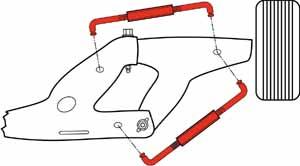



Stiffen up your classic Mustang’s chassis with QA1’s tubular subframe connector kit. Designed for 1964–1970 Mustangs, this bolt-on upgrade ties the front and rear subframes together, reducing chassis flex and improving overall handling performance. Perfect for street cars, restomods, and track builds, QA1 subframe connectors make your Mustang feel more solid and responsive. STRENGTHEN YOUR MUSTANG’S FOUNDATION Classic Mustangs are known for body flex, especially when cornering or under hard acceleration. QA1’s tubular subframe connectors solve this by creating a rigid connection between the front and rear frames. The result: more predictable handling, reduced squeaks and rattles, and improved traction for modern driving demands. EASY INSTALLATION These connectors are engineered for a true bolt-on installation with no need to cut into the floorpan. They are built to work with the QA1 4 link suspension and fit tightly to the frame rails for maximum rigidity.
- Application-specific fit for 1964–1970 Ford Mustangs with QA1 4 link rear suspension
- Designed to work with QA1 suspension upgrades for a complete system
- Tubular steel construction for maximum strength with minimal weight
- Enhances traction and stability during acceleration and cornering
- Durable black powder coat finish for long-lasting protection
- Bolt-on installation - no cutting into the floor required
- Reduces chassis flex and improves handling response
This Part Fits:
| Year | Make | Model | Submodel |
|---|---|---|---|
| 1964-1970 | Ford | Mustang | Base |
| 1969-1970 | Ford | Mustang | Boss 302 |
| 1969-1970 | Ford | Mustang | Boss 429 |
| 1970 | Ford | Mustang | Grande |
| 1970 | Ford | Mustang | Mach 1 |
| 1965-1970 | Ford | Mustang | Shelby GT-350 |
| 1966 | Ford | Mustang | Shelby GT-350H |
| 1967-1970 | Ford | Mustang | Shelby GT-500 |
| 1968 | Ford | Mustang | Shelby GT-500KR |
Read More
Nam tempus turpis at metus scelerisque placerat nulla deumantos solicitud felis. Pellentesque diam dolor, elementum etos lobortis des mollis ut risus. Sedcus faucibus an sullamcorper mattis drostique des commodo pharetras loremos.
Returns Policy
Lorem ipsum dolor sit amet, consectetur adipiscing elit. Morbi ut blandit risus. Donec mollis nec tellus et rutrum. Orci varius natoque penatibus et magnis dis parturient montes, nascetur ridiculus mus. Ut consequat quam a purus faucibus scelerisque. Mauris ac dui ante. Pellentesque congue porttitor tempus. Donec sodales dapibus urna sed dictum. Duis congue posuere libero, a aliquam est porta quis.
Donec ullamcorper magna enim, vitae fermentum turpis elementum quis. Interdum et malesuada fames ac ante ipsum primis in faucibus.
Curabitur vel sem mi. Proin in lobortis ipsum. Aliquam rutrum tempor ex ac rutrum. Maecenas nunc nulla, placerat at eleifend in, viverra etos sem. Nam sagittis lacus metus, dignissim blandit magna euismod eget. Suspendisse a nisl lacus. Phasellus eget augue tincidunt, sollicitudin lectus sed, convallis desto. Pellentesque vitae dui lacinia, venenatis erat sit amet, fringilla felis. Nullam maximus nisi nec mi facilisis.
Shipping
Lorem ipsum dolor sit amet, consectetur adipiscing elit. Morbi ut blandit risus. Donec mollis nec tellus et rutrum. Orci varius natoque penatibus et magnis dis parturient montes, nascetur ridiculus mus. Ut consequat quam a purus faucibus scelerisque. Mauris ac dui ante. Pellentesque congue porttitor tempus. Donec sodales dapibus urna sed dictum. Duis congue posuere libero, a aliquam est porta quis.
Donec ullamcorper magna enim, vitae fermentum turpis elementum quis. Interdum et malesuada fames ac ante ipsum primis in faucibus.
Curabitur vel sem mi. Proin in lobortis ipsum. Aliquam rutrum tempor ex ac rutrum. Maecenas nunc nulla, placerat at eleifend in, viverra etos sem. Nam sagittis lacus metus, dignissim blandit magna euismod eget. Suspendisse a nisl lacus. Phasellus eget augue tincidunt, sollicitudin lectus sed, convallis desto. Pellentesque vitae dui lacinia, venenatis erat sit amet, fringilla felis. Nullam maximus nisi nec mi facilisis.
Yes it is.
Please make sure that you follow below steps:
1/ Download the package from themeforest.net (the file is in zip format)
2/ Extract the file you've just downloaded.
3/ Find this file: ella-3.0.0-sections-ready.zip in the folder Ella Sections Ready 3.0.0, then you just need to upload ella-3.0.0-sections-ready.zip file to your Shopify store.
To save your time and reach our support quickly, please follow below steps:
1/ Create a staff account for us (with Themes permission and Settings permission) http://docs.shopify.com/manual/settings/account/staff-members
2/ Capture screenshot or video for the issue you get.
3/ Specify which template and version you are using.
4/ Describe clearly how to reproduce the issue.
5/ Send all information (staff account, screenshot, video, template name and version, description of the issues, link) to email@domain.com
Yes, we will assist you to install the template if needed
Yes, we do. Please send your customisation requests to email@domain.com, we will give you our quote. Thank you.
Yes. You can turn on/off the animation in the Setting page.
Yes. You can turn on/off almost any blocks on the page (featured products, slideshow, banners, related products, recent products,...).
Yes, we have a setting for you to switch between these two options: Display on Hover and Display on Click.
The theme package includes theme source, Photoshop design files, sample data and manual guide.
That is not a problem. You just need to modify the width/height ratio in theme settings.

